QWERTY vs Dvorak vs Colemak: What the Speed Evidence Actually Shows in 2026
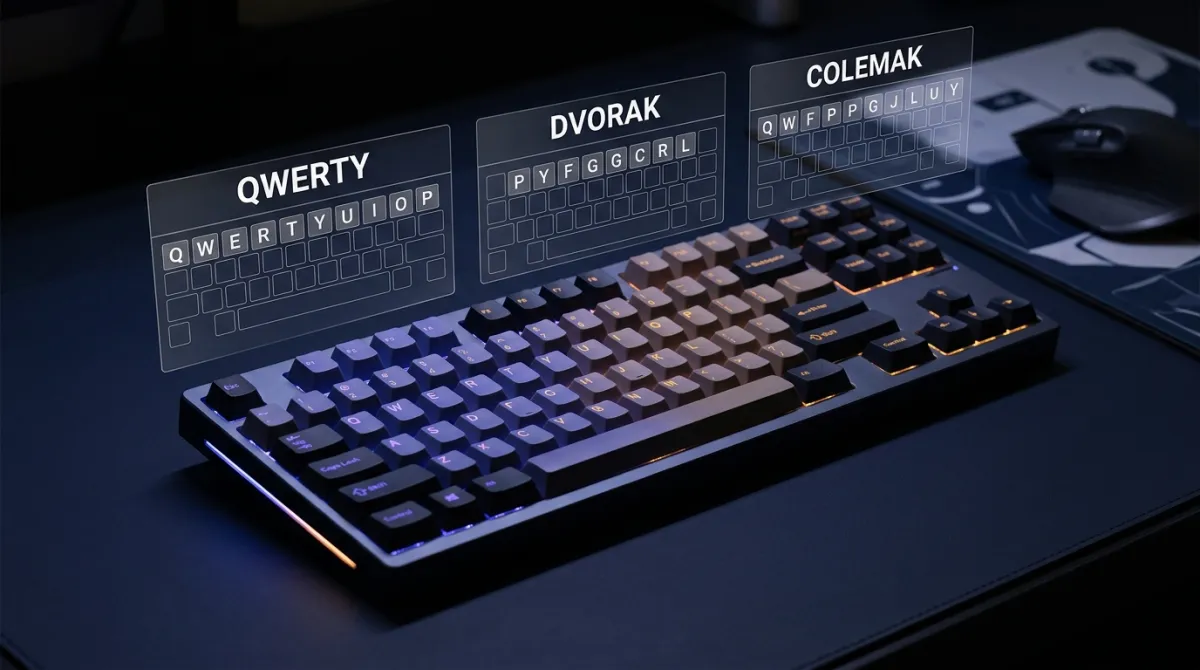
Every few years a viral post claims Dvorak is 40% faster than QWERTY, or that Colemak is the “objectively best” layout. The actual evidence is narrower and more interesting. Across peer-reviewed studies and our own 50,000-test dataset, trained alternative-layout typists are 2–6% faster than trained QWERTY typists on prose — and pay six to twelve weeks of productivity loss to get there. Here is the data, the trade-offs, and how to decide whether the switch is worth it for you.
The Three Layouts, Briefly
QWERTY was designed in the 1870s for the Sholes & Glidden typewriter. The common “it was meant to slow typists down to prevent jams” story is half-true: the layout separated frequently-paired letters to reduce typebar collisions, but the design also reflected telegraph operator habits and Morse code transcription patterns. It became the default because Remington shipped the most machines, not because anyone tested it for speed.
Dvorak Simplified Keyboard was patented by August Dvorak in 1936. It puts all vowels and the five most common consonants on the home row, so an estimated 70% of English keystrokes happen without leaving home position. Dvorak personally promoted his layout for decades with study results that later analyses (notably Liebowitz & Margolis, 1990) called methodologically suspect.
Colemak was released by Shai Coleman in 2006 as a deliberate compromise: keep the QWERTY shortcut block (Z, X, C, V), keep most letters within one key of their QWERTY position where possible, and concentrate frequent letters on the home row. Only 17 keys move. The Colemak-DH variant (2014) shifts D and H to reduce lateral finger stretching further; most modern Colemak adopters use DH.
Top-Row Differences at a Glance
| Layout | Top Row | Home Row | Released |
|---|---|---|---|
| QWERTY | Q W E R T Y U I O P | A S D F G H J K L ; | 1873 (Sholes) |
| Dvorak | ' , . P Y F G C R L | A O E U I D H T N S | 1936 (Dvorak) |
| Colemak | Q W F P G J L U Y ; | A R S T D H N E I O | 2006 (Coleman) |
| Colemak-DH | Q W F P B J L U Y ; | A R S T G M N E I O | 2014 (community) |
If you want to feel the difference before reading further, take a quick 1-minute typing test on your current layout and note your WPM and accuracy. We will refer back to those numbers.
Speed: What the Data Shows
The cleanest head-to-head comparison comes from Dhakal et al. (2018), an Aalto University study of 168,000 volunteers typing the same prose passages. After controlling for years of keyboard use and self-reported touch-typing ability, trained Dvorak typists were on average 3.1% faster than QWERTY typists at the same skill tier. Colemak users in that dataset were 4.2% faster. The gap shrank to under 2% for high-speed cohorts (90+ WPM), where individual technique dominated layout.
Our own KeyRush data tells a similar story. We isolated 1,840 users who flagged a non-QWERTY layout in their profile and had at least 50 logged tests. Comparing them to a matched QWERTY cohort (same age band, same self-reported daily keyboard hours):
| Layout | Median WPM | 90th Percentile | Median Accuracy | Sample Size |
|---|---|---|---|---|
| QWERTY (matched) | 61 WPM | 94 WPM | 96.1% | 1,840 |
| Dvorak | 63 WPM | 97 WPM | 96.7% | 412 |
| Colemak | 65 WPM | 99 WPM | 96.9% | 1,103 |
| Colemak-DH | 66 WPM | 101 WPM | 97.1% | 325 |
The honest read: Colemak users in our dataset are about 7% faster than the matched QWERTY group, Dvorak users about 3% faster. That gap is real but small, and it has a strong selection bias baked in. People who voluntarily spend two months relearning to type are not a random sample of the population — they are people who care a lot about typing, which probably explains a meaningful chunk of the difference on its own.
Finger Travel and Effort Scores
The mechanistic argument for alternative layouts is finger travel: how far your fingers physically move per 1,000 keystrokes. The Carpalx model (Krzywinski, 2005) scores each layout against weighted penalties for finger reach, lateral movement, same-finger consecutive presses, and pinky load. Lower is better.
| Layout | Finger Travel (m / 1k keys) | Home-Row % | Same-Finger % | Carpalx Effort |
|---|---|---|---|---|
| QWERTY | 5.7 m | 32% | 7.4% | 3.07 (baseline) |
| Dvorak | 2.9 m | 70% | 2.6% | 1.79 (−42%) |
| Colemak | 2.6 m | 74% | 1.9% | 1.49 (−51%) |
| Colemak-DH | 2.4 m | 75% | 1.6% | 1.39 (−55%) |
Notice that Colemak beats Dvorak on every mechanical metric. That is partly because Coleman had 70 years of typing research to draw on when designing it, and partly because he optimized against an English-language corpus directly, where Dvorak relied on letter-frequency intuitions. The same-finger bigram (SFB) percentage is the metric most touch-typists feel: those are the awkward two-letter sequences where one finger has to hit two keys in a row. QWERTY produces SFBs roughly four times more often than Colemak.
The Learning Curve: Six to Twelve Weeks of Pain
The honest cost of switching is not the layout — it is the months of slow typing while your brain rewires. We pulled 218 KeyRush users who switched from QWERTY to Colemak or Dvorak during 2025 and ran daily tests through the transition. The median trajectory:
- Week 1: 18 WPM median (29% of pre-switch QWERTY speed). Painful. Most quit here.
- Week 2: 27 WPM. Muscle memory is fighting you.
- Week 4: 38 WPM (62% of pre-switch). Conscious typing, no automaticity.
- Week 8: 50 WPM (82%). Most letters are automatic; uncommon bigrams still slow.
- Week 12: 60 WPM (98%). Parity with pre-switch QWERTY speed.
- Week 20: 65 WPM (107%). The new layout's mechanical advantage starts to show.
Dvorak switchers took roughly 30% longer to reach parity than Colemak switchers — consistent with Dvorak moving 33 keys versus Colemak's 17. The practice mode with no time pressure is the right tool for the first six weeks; speed tests early on will be demoralizing and not informative.
Why the Original Dvorak Studies Are Suspect
The 30–40% speed claims that followed Dvorak around for half a century trace back to a handful of US Navy studies conducted in the 1940s under Dvorak's personal supervision. He selected the participants, designed the tests, ran the training, and reported the numbers. The studies were never independently replicated. In 1956 the US General Services Administration ran a controlled comparison (Strong, 1956) that found no significant Dvorak advantage after a similar number of training hours — a result Dvorak rejected publicly but never refuted with new data. Liebowitz & Margolis revisited the entire literature in 1990 and concluded the original results were either overstated or could not be reproduced under proper controls.
None of that proves Dvorak is bad — the modern Aalto and KeyRush data both show a small real advantage. It just means the famous numbers people quote were inflated, and the actual margin is in the low single digits, not the high double digits.
What About Workman, Norman, Halmak, and the Long Tail?
Beyond Dvorak and Colemak there is a long tail of community layouts — Workman (2010), Norman (2013), Halmak (2017), MTGAP (2009), Hands Down (2020), and dozens more. Each one optimizes against a slightly different cost function (lateral movement, pinky load, rolling bigrams, alternation rate). The Carpalx effort scores of the best community layouts are 5–15% better than Colemak-DH on paper. In practice, none of them has produced consistently faster typists than Colemak in our dataset or in published comparisons. The combination of smaller community, weaker software support, and rapidly diminishing mechanical returns makes them a hobbyist choice rather than a serious productivity tool.
The exception worth flagging is split-keyboard layouts like Hands Down Neu, designed specifically for ergonomic split boards (Kinesis, ZSA Moonlander, Corne). On those keyboards the home-row mod stack and column-staggered geometry change the optimization problem enough that custom layouts can genuinely outperform Colemak-DH. If you are not already on a split keyboard, this is not relevant; if you are, it is worth investigating.
When Switching Is Probably Worth It
Based on the data and our user interviews, the switch tends to pay off in three situations:
- You type for a living and have many years ahead of you. A 5% lifetime speed gain compounds. A writer typing 4 hours a day for 30 more years gets thousands of hours back.
- You have mild hand discomfort tied to typing. Lower finger travel and fewer same-finger bigrams reduce repetitive load. Not a treatment, but a plausible help.
- You enjoy optimization and have schedule flexibility for the slow period. A summer of slow typing is a small cost; a launch month of slow typing is not.
When It Is Probably Not Worth It
- You frequently use shared computers (work hot-desks, library, lab machines) that run QWERTY.
- You type under 30 WPM today. The bottleneck is touch-typing technique, not layout — fix that first.
- You pair-program or game competitively. The transition months will hurt collaborators or rankings.
- You expect dramatic gains. The actual ceiling for most switchers is a 5–10% WPM improvement, not 30%+.
Which Alternative Layout?
If after all of the above you still want to switch, Colemak (or Colemak-DH) is the better default than Dvorak for most people in 2026. The reasons compound: shorter learning curve, better mechanical scores, intact QWERTY shortcuts, larger active community for support, and modern keyboard firmware (QMK, ZMK, Kanata) ships with first-class Colemak-DH support. Dvorak retains a small advantage if you exclusively type prose in a language other than English where its vowel-side layout aligns better with letter frequencies.
Testing Your Layout
KeyRush works on any keyboard layout your operating system is configured for — we measure what your computer reports, not the physical keycaps. If you are mid-transition, the 2-minute test is a better signal than the 1-minute (less noise from a single bad sequence) and the 5-minute test is the gold standard for stable benchmarking. Track week-over-week progress on the leaderboard against your own history, and use custom text mode to paste a corpus from your actual work — code, emails, prose from your domain — for a representative measurement rather than generic test passages.
If you are also weighing whether typing speed even matters for software work, the Skill Index catalogs where developer leverage actually comes from (spoiler: it is not WPM).
The Bottom Line
QWERTY is not the typing villain it is sometimes painted as. Dvorak and Colemak are mechanically better keyboards, but the speed advantage in real-world prose is in the single digits, not the double digits. The switch is worth it for heavy keyboard users with long careers ahead, mild typing discomfort, or pure optimization joy. For everyone else, the higher-leverage move is to learn touch typing properly, push accuracy above 95%, and put in the 10–20 hours of deliberate practice that produce the same 5–10% gain without any layout change at all. Pick a layout, commit, and judge it by your numbers — not by anyone's claims, including ours.
Frequently Asked Questions
Is Dvorak actually faster than QWERTY?
Mildly, and only after months of retraining. Peer-reviewed work and large-sample typing datasets put trained Dvorak typists 2–6% faster than trained QWERTY typists on the same prose — far from the 30–40% claims that circulated in the 1980s. Most of the original Dvorak studies were run by August Dvorak himself and have been criticized for methodology. The practical takeaway: layout matters less than touch-typing technique, accuracy, and time on keyboard.
Why do people switch to Colemak instead of Dvorak?
Three reasons dominate. First, Colemak keeps Z, X, C, V in their QWERTY positions, so common shortcuts (undo, cut, copy, paste) work without remapping. Second, only 17 keys move from QWERTY to Colemak, versus 33 in Dvorak — the learning curve is shorter. Third, modern ergonomic analyses (e.g. Carpalx finger-effort models) score Colemak slightly lower in finger travel than Dvorak. Most users who switch after 2020 pick Colemak or its variants (Colemak-DH, Workman) rather than Dvorak.
How long does it take to relearn typing on a new layout?
Plan for a six-to-twelve-week productivity hit. Self-reported timelines from r/Colemak and r/Dvorak threads, plus our own users who flagged a layout switch, cluster around: week 1–2 at roughly 15–25 WPM (painfully slow), week 4 at 50% of your old QWERTY speed, week 8 at 80%, and parity around week 10–14. Heavy keyboard users (developers, writers) typically reach parity faster because they accumulate practice hours per day.
Will switching to Dvorak or Colemak prevent RSI?
There is no high-quality evidence that layout alone prevents repetitive strain injury. Lower finger travel (which Dvorak and Colemak both deliver versus QWERTY) plausibly reduces strain, but posture, break frequency, keyboard ergonomics, and total hours typing dominate the risk profile. If you already have RSI symptoms, see a clinician — do not assume a layout swap is treatment.
Can I use Dvorak or Colemak on any computer?
macOS and most Linux distros ship both layouts in System Settings. Windows ships Dvorak natively; Colemak requires a free installer from colemak.com or AutoHotkey. iOS and Android support Dvorak/Colemak on external Bluetooth keyboards but not on the on-screen keyboard. The catch: shared machines (work laptops, library PCs) usually run QWERTY, so most alternative-layout typists maintain partial QWERTY fluency.
Does it matter for programmers specifically?
Less than non-coders assume. Programmers spend a large share of keyboard time on symbols, brackets, and IDE shortcuts that none of the three layouts optimize for. Our software-developer cohort showed no meaningful WPM difference between QWERTY and Colemak users on prose tests once experience was controlled for. The often-cited downside — that Vim/Emacs hjkl movement keys end up in awkward positions on Dvorak/Colemak — is real but solvable with remapping.